Skip to content
YACReader

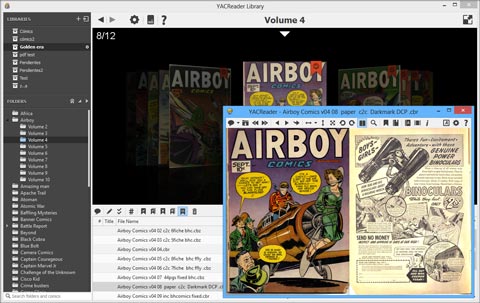
The new user interface for YACReader and YACReaderLibrary is ready! But this is not the only new feature, check the change log and get it!

  • New user interface
  • Improved the stability of the server (iOS users)
  • New design for the properties dialog (new interactive cover preview and selection)
  • History navigation (backward and forward buttons added to the library)
  • Improved libraries management
  • Magnifying background color matches now the viewer background color
  • New set to height button
  • Better double page mode (normalized page height)
  • Delete comics from the disk using the library
  • Button for hiding the covers in the import screen
  • Reordering columns in the comics view is now possible
  • New column 'Read' added
  • General stability improvements
  • Bug fixes
YACReader 6.5.3 screen shot

New user interface - YACReader 6.5.3

Thanks for downloading YACReader!

Your download is starting.

YACReader for iOS and Android

Connect to YACReaderLibrary to browse, read remotely and import comics. Your reading progress is synchronized across devices.

Download on the App Store Get it on Google Play Available at Amazon Appstore

Discover all the features on the iOS and Android pages, and learn how to use them in the iOS and Android user guides.

Support YACReader

YACReader for desktop and server is free to use, but it is not free to develop: maintaining this website, developer programs, code signing certificates, test devices and, of course, all the time it takes. Less than 0.01% of downloads end in a donation, so any amount counts.

By supporting the project you help keep it regularly updated and, most importantly, alive. Thanks!