 YACReader
- Posts: 11
- Thank you received: 0
Help and support for Linux users.
Lib no longer working after 9.8.0 - raspberry-pi
- dreibona
-
 Topic Author
- Offline
- New Member
-

Less
More
5 years 4 months ago #5953
by dreibona
Lib no longer working after 9.8.0 - raspberry-pi was created by dreibona
Hi, I made this dockerfile and was able to run the server on a raspberry-py 4 for months with the version 9.7.1. (setup is raspios-buster-armhf-lite, openmediavault5 and Portainer)
Today, I updated the container to run the last version 9.8.0 and everything works fine, I can navigate the library folders in the ipad (latest version), but when I try to open a comic book I receive a popup error on ipad "Timeout loading Unable to connect to YACReaderLibrary" blackscreen and the server shutdown. The comic book or any didn't load.
Is there any new package that I need to updated in the Dockerfile to run the latest version? What am I missing?
My workaround was to build a second image with "git checkout tags/9.7.1" and it works as it should.
Any thoughts is appreciated
Code:
FROM debian:buster
LABEL maintainer="dreibona"
WORKDIR /src
WORKDIR git
# Update system
RUN apt-get update && \
apt-get -y install qt5-default libpoppler-qt5-dev libpoppler-qt5-1 wget unzip libqt5sql5-sqlite libqt5sql5 sqlite3 libqt5network5 libqt5gui5 libqt5core5a build-essential qtdeclarative5-dev libqt5multimedia5 libqt5multimedia5-plugins libunarr-dev qtmultimedia5-dev libqt5svg5 libqt5quickcontrols2-5 curl git make g++ qtscript5-dev qt5-qmake qtbase5-dev libglu1-mesa-dev desktop-file-utils libqt5svg5* libqt5opengl5-dev mercurial zip
RUN git clone https://github.com/YACReader/yacreader.git . && \
git checkout master
RUN cd compressed_archive/unarr/ && \
wget github.com/selmf/unarr/archive/master.zip && \
unzip master.zip && \
rm master.zip && \
cd unarr-master/lzmasdk && \
ln -s 7zTypes.h Types.h
RUN cd /src/git/YACReaderLibraryServer && \
qmake YACReaderLibraryServer.pro && \
make -j4 && \
make install
RUN cd / && \
rm -rf /src && \
rm -rf /var/cache/apt &&\
apt-get purge -y git wget build-essential && \
apt-get -y autoremove
ADD YACReaderLibrary.ini /root/.local/share/YACReader/YACReaderLibrary/
VOLUME /Comics
EXPOSE 46000
ENV LC_ALL=C.UTF8
ENTRYPOINT ["YACReaderLibraryServer","start"]
Today, I updated the container to run the last version 9.8.0 and everything works fine, I can navigate the library folders in the ipad (latest version), but when I try to open a comic book I receive a popup error on ipad "Timeout loading Unable to connect to YACReaderLibrary" blackscreen and the server shutdown. The comic book or any didn't load.
Is there any new package that I need to updated in the Dockerfile to run the latest version? What am I missing?
My workaround was to build a second image with "git checkout tags/9.7.1" and it works as it should.
Any thoughts is appreciated
Please Log in or Create an account to join the conversation.
- Luis Ángel
-

- Offline
- Administrator
-

Less
More
- Posts: 3354
- Thank you received: 692
5 years 4 months ago #5955
by Luis Ángel
Contribute to the project becoming a patron: www.patreon.com/yacreader
You can also donate via Pay-Pal: www.paypal.com/donate?business=5TAMNQCDD...e=Support+YACReader\
Replied by Luis Ángel on topic Lib no longer working after 9.8.0 - raspberry-pi
I will take a look
Contribute to the project becoming a patron: www.patreon.com/yacreader
You can also donate via Pay-Pal: www.paypal.com/donate?business=5TAMNQCDD...e=Support+YACReader\
Please Log in or Create an account to join the conversation.
- Luis Ángel
-
- Offline
- Administrator
-
Less
More
- Posts: 3354
- Thank you received: 692
5 years 4 months ago #5956
by Luis Ángel
Contribute to the project becoming a patron: www.patreon.com/yacreader
You can also donate via Pay-Pal: www.paypal.com/donate?business=5TAMNQCDD...e=Support+YACReader\
Replied by Luis Ángel on topic Lib no longer working after 9.8.0 - raspberry-pi
Seems to be working fine in Windows...so hopefully it is just a setup problem
Contribute to the project becoming a patron: www.patreon.com/yacreader
You can also donate via Pay-Pal: www.paypal.com/donate?business=5TAMNQCDD...e=Support+YACReader\
Please Log in or Create an account to join the conversation.
- Luis Ángel
-
- Offline
- Administrator
-
Less
More
- Posts: 3354
- Thank you received: 692
5 years 4 months ago #5958
by Luis Ángel
Contribute to the project becoming a patron: www.patreon.com/yacreader
You can also donate via Pay-Pal: www.paypal.com/donate?business=5TAMNQCDD...e=Support+YACReader\
Replied by Luis Ángel on topic Lib no longer working after 9.8.0 - raspberry-pi
What version of the app are you using in iOS?
Contribute to the project becoming a patron: www.patreon.com/yacreader
You can also donate via Pay-Pal: www.paypal.com/donate?business=5TAMNQCDD...e=Support+YACReader\
Please Log in or Create an account to join the conversation.
- dreibona
-
Topic Author
- Offline
- New Member
-
Less
More
- Posts: 11
- Thank you received: 0
5 years 4 months ago #5959
by dreibona
Replied by dreibona on topic Lib no longer working after 9.8.0 - raspberry-pi
I tryed with the last version 3.14.1 and the testflight, the problem persist, 9.8.0 i can navigate the server files/folders but can't open the cbx file. 9.7.1 works nice.
Also I tested the headless version without the docker and the problem is the same.
I just compiled the last version os raspiOS and the problem is the same... On the YACReader Library app (local) if I double click the comic I received a message - comic not found. I can connect the server, navigate but not open the comic book file.
BTW Thanks a lot for your help
Also I tested the headless version without the docker and the problem is the same.
I just compiled the last version os raspiOS and the problem is the same... On the YACReader Library app (local) if I double click the comic I received a message - comic not found. I can connect the server, navigate but not open the comic book file.
BTW Thanks a lot for your help
Please Log in or Create an account to join the conversation.
- selmf
- Offline
- Moderator
-

Less
More
- Posts: 639
- Thank you received: 136
5 years 4 months ago #5960
by selmf
My answers are not necessarily official YACReader statements but mostly represent my own opinion in technical matters.
Replied by selmf on topic Lib no longer working after 9.8.0 - raspberry-pi
First thing to test in this case is if opening comics works at all. Can you open a comic using a local version of YACReader (not via the Library app)?
Otherwise this sounds like a configuration/path problem, i.e. the server can find your library database and existing covers just fine but for some reason cannot locate or open the comics. Have you checked the log messages of the headless server? It should show you right at the start which libraries it is seeing at which path.
Otherwise this sounds like a configuration/path problem, i.e. the server can find your library database and existing covers just fine but for some reason cannot locate or open the comics. Have you checked the log messages of the headless server? It should show you right at the start which libraries it is seeing at which path.
My answers are not necessarily official YACReader statements but mostly represent my own opinion in technical matters.
The following user(s) said Thank You: dreibona
Please Log in or Create an account to join the conversation.
- Luis Ángel
-
- Offline
- Administrator
-
Less
More
- Posts: 3354
- Thank you received: 692
5 years 4 months ago #5961
by Luis Ángel
Can you create a small test libary with YACReaderLibrary 9.8.0 and test if you can open comics?
Did you try to update your existing libraries? Because the library information seems to be there, but the "comic not found" error message indicates the path in the data base no longer points to the actual files.
Contribute to the project becoming a patron: www.patreon.com/yacreader
You can also donate via Pay-Pal: www.paypal.com/donate?business=5TAMNQCDD...e=Support+YACReader\
Replied by Luis Ángel on topic Lib no longer working after 9.8.0 - raspberry-pi
dreibona wrote: I tryed with the last version 3.14.1 and the testflight, the problem persist, 9.8.0 i can navigate the server files/folders but can't open the cbx file. 9.7.1 works nice.
Also I tested the headless version without the docker and the problem is the same.
I just compiled the last version os raspiOS and the problem is the same... On the YACReader Library app (local) if I double click the comic I received a message - comic not found. I can connect the server, navigate but not open the comic book file.
BTW Thanks a lot for your help
Can you create a small test libary with YACReaderLibrary 9.8.0 and test if you can open comics?
Did you try to update your existing libraries? Because the library information seems to be there, but the "comic not found" error message indicates the path in the data base no longer points to the actual files.
Contribute to the project becoming a patron: www.patreon.com/yacreader
You can also donate via Pay-Pal: www.paypal.com/donate?business=5TAMNQCDD...e=Support+YACReader\
Please Log in or Create an account to join the conversation.
- dreibona
-
Topic Author
- Offline
- New Member
-
Less
More
- Posts: 11
- Thank you received: 0
5 years 4 months ago #5962
by dreibona
Please check the logs with comments for more details:
Replied by dreibona on topic Lib no longer working after 9.8.0 - raspberry-pi
I can't, "comic not found" error.Can you open a comic using a local version of YACReader (not via the Library app)?
Sure, and this time I can't see folders (and open comics) of the new library.Can you create a small test libary with YACReaderLibrary 9.8.0 and test if you can open comics?
yesDid you try to update your existing libraries?
Please check the logs with comments for more details:
Please Log in or Create an account to join the conversation.
- Luis Ángel
-
- Offline
- Administrator
-
Less
More
- Posts: 3354
- Thank you received: 692
5 years 4 months ago #5963
by Luis Ángel
Contribute to the project becoming a patron: www.patreon.com/yacreader
You can also donate via Pay-Pal: www.paypal.com/donate?business=5TAMNQCDD...e=Support+YACReader\
Replied by Luis Ángel on topic Lib no longer working after 9.8.0 - raspberry-pi
Can you create a library with one or more PDF files and see if it works?
Contribute to the project becoming a patron: www.patreon.com/yacreader
You can also donate via Pay-Pal: www.paypal.com/donate?business=5TAMNQCDD...e=Support+YACReader\
Please Log in or Create an account to join the conversation.
- dreibona
-
Topic Author
- Offline
- New Member
-
Less
More
- Posts: 11
- Thank you received: 0
5 years 4 months ago #5964
by dreibona
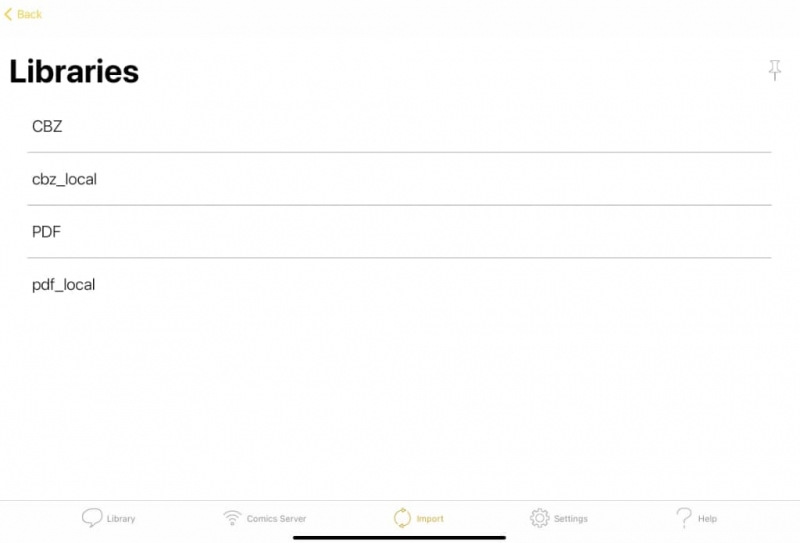
So, just to double check if it was a problem with my external drive I created 2 libs, one with cbx and another with pdf on the external drive and the same on the local system drive.
Follow the structure and the log:
Replied by dreibona on topic Lib no longer working after 9.8.0 - raspberry-pi
Short answer: it works on both drives.Can you create a library with one or more PDF files and see if it works?
So, just to double check if it was a problem with my external drive I created 2 libs, one with cbx and another with pdf on the external drive and the same on the local system drive.
Follow the structure and the log:
Please Log in or Create an account to join the conversation.
Moderators: Luis Ángel