 YACReader
- Posts: 1
- Thank you received: 1
If you know how to improve YACReader, please tell me your ideas.
iOS Files Integration
- enanogrande1
- Topic Author
- Offline
- New Member
-

Less
More
7 years 2 months ago #4633
by enanogrande1
iOS Files Integration was created by enanogrande1
Let me start off by saying I love YACReader, have been using it for years. The Library/Reader solution you came up with for syncing and managing libraries is great and I’ve made good use of it so far. However, I feel it has some limitations in certain use cases that can be dealt with through better files app
Specifically, as I move more and more towards doing most of my computing on an iPad, YACR remains one of the apps that are still reliant on a PC/Mac to sync. Getting files onto the iPad without using YACReader Library is a bit more difficult than I would hope (I don’t want to upload my collection to OneDrive/Dropbox, so I haven’t tried that method year which I’m sure would be a little bit easier).
I know you already have some files integration already through the “more...” option on the import tab. This document picker is very limited however, mostly due to it only being possible to select/import one item at a time.
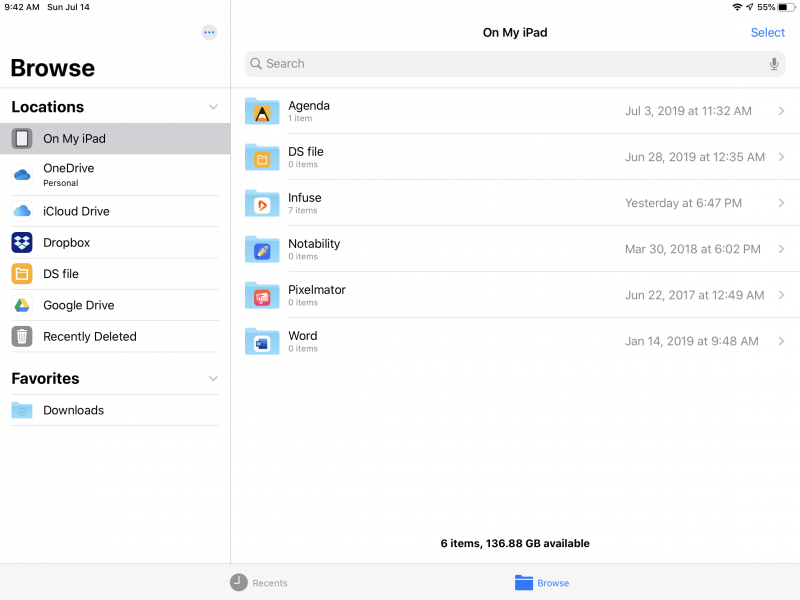
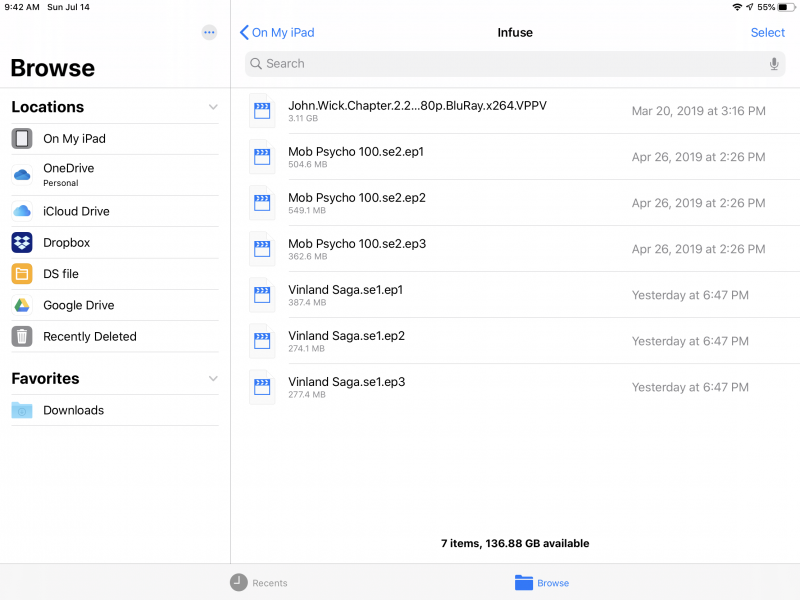
The change I’m requesting/suggesting is the setup the Infuse iOS app uses - there is an “Infuse” folder in the “on my iPad/iPhone” section of the Files app, and this shows the full folder structure of infuse and the videos it holds. A user can then add/remove any folder or video from within the files app, dragging and dropping from different services (including USB and SMB servers with the new iPadOS update!). I would imagine you could even deprecate your custom OneDrive/Google Drive/etc. support from within the app if you would like, as that functionality is already taken care of in Files.
Thanks for reading, but more so thanks for developing this app for all these years.
Specifically, as I move more and more towards doing most of my computing on an iPad, YACR remains one of the apps that are still reliant on a PC/Mac to sync. Getting files onto the iPad without using YACReader Library is a bit more difficult than I would hope (I don’t want to upload my collection to OneDrive/Dropbox, so I haven’t tried that method year which I’m sure would be a little bit easier).
I know you already have some files integration already through the “more...” option on the import tab. This document picker is very limited however, mostly due to it only being possible to select/import one item at a time.
The change I’m requesting/suggesting is the setup the Infuse iOS app uses - there is an “Infuse” folder in the “on my iPad/iPhone” section of the Files app, and this shows the full folder structure of infuse and the videos it holds. A user can then add/remove any folder or video from within the files app, dragging and dropping from different services (including USB and SMB servers with the new iPadOS update!). I would imagine you could even deprecate your custom OneDrive/Google Drive/etc. support from within the app if you would like, as that functionality is already taken care of in Files.
Thanks for reading, but more so thanks for developing this app for all these years.
The following user(s) said Thank You: jocala
Please Log in or Create an account to join the conversation.
- RUSHSAUN
- Offline
- New Member
-
Less
More
- Posts: 3
- Thank you received: 0
6 years 4 months ago #5246
by RUSHSAUN
Replied by RUSHSAUN on topic iOS Files Integration
I second this. I use one drive and Dropbox but would prefer a more intuitive files integration. Giving access to the YAC file structure with the files app would make importing easier and allow for exporting any old unwanted issues.
Also I yes GREAT APP!!!
Also I yes GREAT APP!!!
Please Log in or Create an account to join the conversation.
- Luis Ángel
-

- Offline
- Administrator
-

Less
More
- Posts: 3354
- Thank you received: 692
6 years 4 months ago #5256
by Luis Ángel
Contribute to the project becoming a patron: www.patreon.com/yacreader
You can also donate via Pay-Pal: www.paypal.com/donate?business=5TAMNQCDD...e=Support+YACReader\
Replied by Luis Ángel on topic iOS Files Integration
I am already working on this. There won't be any YACReader folder, you'll be able to select any folder you want as your library.
Contribute to the project becoming a patron: www.patreon.com/yacreader
You can also donate via Pay-Pal: www.paypal.com/donate?business=5TAMNQCDD...e=Support+YACReader\
The following user(s) said Thank You: enanogrande1, RUSHSAUN
Please Log in or Create an account to join the conversation.
Moderators: Luis Ángel