 YACReader
- Posts: 10
- Thank you received: 0
Help and support for iPad, iPhone and iPod touch users.
Import Whole Folders From Mac to iPad
- igc099
- Topic Author
- Offline
- New Member
-

Less
More
12 years 1 month ago #615
by igc099
Import Whole Folders From Mac to iPad was created by igc099
Hi, I was wondering how you can import whole folders from the YACReader on my Mac from the iPad app? It says on the website for the app that "You can import comics or whole folders, YACReader for iOS will keep your folder organization and all your comic tags.", but I can't figure out how. Thank you for your help!
P.S. This app would totally seal the deal for me if you included synchronization between devices
P.S. This app would totally seal the deal for me if you included synchronization between devices
Please Log in or Create an account to join the conversation.
- Luis Ángel
-

- Offline
- Administrator
-

Less
More
- Posts: 3354
- Thank you received: 692
12 years 1 month ago #616
by Luis Ángel
Contribute to the project becoming a patron: www.patreon.com/yacreader
You can also donate via Pay-Pal: www.paypal.com/donate?business=5TAMNQCDD...e=Support+YACReader\
Replied by Luis Ángel on topic Import Whole Folders From Mac to iPad
You can use YACReaderLibrary or Dropbox sync. iTunes doesn't allow the users to drop folders in the documents app folder.
Reading progress sync is in the TODO list for future versions.
Reading progress sync is in the TODO list for future versions.
Contribute to the project becoming a patron: www.patreon.com/yacreader
You can also donate via Pay-Pal: www.paypal.com/donate?business=5TAMNQCDD...e=Support+YACReader\
Please Log in or Create an account to join the conversation.
- igc099
- Topic Author
- Offline
- New Member
-
Less
More
- Posts: 10
- Thank you received: 0
12 years 1 month ago #618
by igc099
Replied by igc099 on topic Import Whole Folders From Mac to iPad
Can you please give me a step by step instruction because I don't see the option for importing entire folders instead of having to import my comics one by one from the YACReader library?
Please Log in or Create an account to join the conversation.
- Luis Ángel
-
- Offline
- Administrator
-
Less
More
- Posts: 3354
- Thank you received: 692
12 years 1 month ago #619
by Luis Ángel
Contribute to the project becoming a patron: www.patreon.com/yacreader
You can also donate via Pay-Pal: www.paypal.com/donate?business=5TAMNQCDD...e=Support+YACReader\
Replied by Luis Ángel on topic Import Whole Folders From Mac to iPad
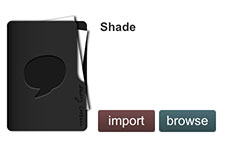
Just tap the import button in any folder.
Contribute to the project becoming a patron: www.patreon.com/yacreader
You can also donate via Pay-Pal: www.paypal.com/donate?business=5TAMNQCDD...e=Support+YACReader\
Please Log in or Create an account to join the conversation.
- igc099
- Topic Author
- Offline
- New Member
-
Less
More
- Posts: 10
- Thank you received: 0
12 years 1 month ago - 12 years 1 month ago #621
by igc099
Replied by igc099 on topic Import Whole Folders From Mac to iPad
Oh, I see my problem. Instead of trying to import folders, I was actually trying to import libraries. Is there any difference between the two?
I apologize for the confusion; I'm still new to YACReader.
I apologize for the confusion; I'm still new to YACReader.
Last edit: 12 years 1 month ago by igc099.
Please Log in or Create an account to join the conversation.
- Luis Ángel
-
- Offline
- Administrator
-
Less
More
- Posts: 3354
- Thank you received: 692
12 years 1 month ago #623
by Luis Ángel
Contribute to the project becoming a patron: www.patreon.com/yacreader
You can also donate via Pay-Pal: www.paypal.com/donate?business=5TAMNQCDD...e=Support+YACReader\
Replied by Luis Ángel on topic Import Whole Folders From Mac to iPad
Yes, you probably want to have one library created in your top level comics folder. Then you can use YACReaderLibrary for browsing your whole collection.
You can read this: www.yacreader.com/forum/support-windows/...ibrary-best-practice
You can read this: www.yacreader.com/forum/support-windows/...ibrary-best-practice
Contribute to the project becoming a patron: www.patreon.com/yacreader
You can also donate via Pay-Pal: www.paypal.com/donate?business=5TAMNQCDD...e=Support+YACReader\
Please Log in or Create an account to join the conversation.
- igc099
- Topic Author
- Offline
- New Member
-
Less
More
- Posts: 10
- Thank you received: 0
12 years 1 month ago - 12 years 1 month ago #624
by igc099
Replied by igc099 on topic Import Whole Folders From Mac to iPad
This is great, thank you! I only have one more question, though. How exactly do I create folders? When I go to Folder...Open Folder, the Open Folder option is greyed out.
Last edit: 12 years 1 month ago by igc099.
Please Log in or Create an account to join the conversation.
- Luis Ángel
-
- Offline
- Administrator
-
Less
More
- Posts: 3354
- Thank you received: 692
12 years 1 month ago #625
by Luis Ángel
Contribute to the project becoming a patron: www.patreon.com/yacreader
You can also donate via Pay-Pal: www.paypal.com/donate?business=5TAMNQCDD...e=Support+YACReader\
Replied by Luis Ángel on topic Import Whole Folders From Mac to iPad
Just create a folder in your hard drive, into your comics library path, put some comics inside and then press 'U' for updating the library. YACReaderLibrary will create the folders' structure for you. There is no limit in how many folders and sub-folders you can have.
Contribute to the project becoming a patron: www.patreon.com/yacreader
You can also donate via Pay-Pal: www.paypal.com/donate?business=5TAMNQCDD...e=Support+YACReader\
The following user(s) said Thank You: igc099
Please Log in or Create an account to join the conversation.
- igc099
- Topic Author
- Offline
- New Member
-
Less
More
- Posts: 10
- Thank you received: 0
12 years 1 month ago #626
by igc099
Replied by igc099 on topic Import Whole Folders From Mac to iPad
Ok that makes a lot of sense now haha. Thank you so much, I really appreciate all the help
Please Log in or Create an account to join the conversation.
Moderators: Luis Ángel