 YACReader
- Posts: 1
- Thank you received: 0
Help and support for iPad, iPhone and iPod touch users.
Chapters are marked as books
- ixxof
- Topic Author
- Offline
- New Member
-

Less
More
3 years 11 months ago #7139
by ixxof
Chapters are marked as books was created by ixxof
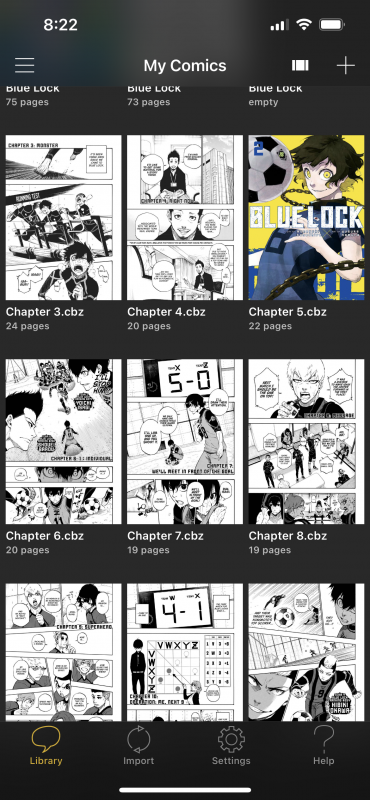
Hello I use Hakuneko on my PC then import it only my iphone using the YAC library feature, but i noticed that individual chapters are marked as different books when I import them onto my iphone. So in my YAC app on my iphone there are soo many chapters and when I want to read something I've got to change to the next chapter manually because it thinks chapter 1 and 2 are different books. And it also looks very messy. Is there a way to fix this?
Please Log in or Create an account to join the conversation.
- Luis Ángel
-

- Offline
- Administrator
-

Less
More
- Posts: 3354
- Thank you received: 692
3 years 11 months ago #7141
by Luis Ángel
Contribute to the project becoming a patron: www.patreon.com/yacreader
You can also donate via Pay-Pal: www.paypal.com/donate?business=5TAMNQCDD...e=Support+YACReader\
Replied by Luis Ángel on topic Chapters are marked as books
The standard in the digital comics world is 1 file 1 book. You are importing several files, each file is a chapter so you end with various files in YACReader.
Contribute to the project becoming a patron: www.patreon.com/yacreader
You can also donate via Pay-Pal: www.paypal.com/donate?business=5TAMNQCDD...e=Support+YACReader\
Please Log in or Create an account to join the conversation.
- motardo
- Offline
- New Member
-
Less
More
- Posts: 5
- Thank you received: 1
3 years 10 months ago #7257
by motardo
Replied by motardo on topic Chapters are marked as books
I just merge all of them into the same cbr/cbz file. usually the name of the pics inside are correlative so there's no need to rename them 
Please Log in or Create an account to join the conversation.
Moderators: Luis Ángel