 YACReader
- Posts: 9
- Thank you received: 0
Help and support for iPad, iPhone and iPod touch users.
Interface Suggestions for New iPad Version
- iamgroot
- Topic Author
- Offline
- New Member
-

Less
More
11 years 2 months ago #1575
by iamgroot
Interface Suggestions for New iPad Version was created by iamgroot
Once an import source is set up, have the option to add it to the Library screen to save a few taps. These days, I don't distinguish between what is on my device and what has to be transferred wirelessly
On the YACReader Import screen, make it clear that "Browse" and "Sync" are tappable. I know you're adhering to Apple's UI guidelines to confuse the user by obscuring what is a UI element (big fan of that, not) but I kept looking for a sync button on the actual comic reader screen.
On the YACReader Import Library screens, have the same display covers options that you have for the local library.
Add an option for the YACReader Import Library individual comics screen that allows the user to specify a default tap cover action - either Import or Read.
Same screen - a long tap on the screen should allow the user to mark the comic as read.
Brilliant job on syncing back reading progress back to YACReader Library!! Very, very useful.
On the YACReader Import screen, make it clear that "Browse" and "Sync" are tappable. I know you're adhering to Apple's UI guidelines to confuse the user by obscuring what is a UI element (big fan of that, not) but I kept looking for a sync button on the actual comic reader screen.
On the YACReader Import Library screens, have the same display covers options that you have for the local library.
Add an option for the YACReader Import Library individual comics screen that allows the user to specify a default tap cover action - either Import or Read.
Same screen - a long tap on the screen should allow the user to mark the comic as read.
Brilliant job on syncing back reading progress back to YACReader Library!! Very, very useful.
Please Log in or Create an account to join the conversation.
- Luis Ángel
-

- Offline
- Administrator
-

Less
More
- Posts: 3354
- Thank you received: 692
11 years 2 months ago #1576
by Luis Ángel
Contribute to the project becoming a patron: www.patreon.com/yacreader
You can also donate via Pay-Pal: www.paypal.com/donate?business=5TAMNQCDD...e=Support+YACReader\
Replied by Luis Ángel on topic Interface Suggestions for New iPad Version
Thank you for the suggestions!
1. The remote library browser will be updated completely
2. I realized that this was a big issue during the beta testing phase, I had no time for changing it. I need to think a better design, or at least add some hints.
3. go to 1
4 and 5. The interaction will be also redesigned, nice ideas.
Thanks, I would like to have a full sync between devices, I will improve the sync mechanism bit by bit
1. The remote library browser will be updated completely
2. I realized that this was a big issue during the beta testing phase, I had no time for changing it. I need to think a better design, or at least add some hints.
3. go to 1
4 and 5. The interaction will be also redesigned, nice ideas.
Thanks, I would like to have a full sync between devices, I will improve the sync mechanism bit by bit
Contribute to the project becoming a patron: www.patreon.com/yacreader
You can also donate via Pay-Pal: www.paypal.com/donate?business=5TAMNQCDD...e=Support+YACReader\
Please Log in or Create an account to join the conversation.
- iamgroot
- Topic Author
- Offline
- New Member
-
Less
More
- Posts: 9
- Thank you received: 0
11 years 2 months ago #1587
by iamgroot
Replied by iamgroot on topic Interface Suggestions for New iPad Version
The sync mechanism already seems to be working better than advertised. When I close a comic or move to the next one in the series it looks like the progress is automatically synced back to the server. And when I mark comics as read on the server, they automatically show up as read in the app. So what's the Sync button for?
Small bug: When you go back to the YACReader Import Library individual comics screen after reading some comics the read statuses of the comics aren't visually updated until you go up a level and then re-enter the screen.
Enhancement request: Add a "Show only unread" toggle button.
Small bug: When you go back to the YACReader Import Library individual comics screen after reading some comics the read statuses of the comics aren't visually updated until you go up a level and then re-enter the screen.
Enhancement request: Add a "Show only unread" toggle button.
Please Log in or Create an account to join the conversation.
- Luis Ángel
-
- Offline
- Administrator
-
Less
More
- Posts: 3354
- Thank you received: 692
11 years 2 months ago #1588
by Luis Ángel
Contribute to the project becoming a patron: www.patreon.com/yacreader
You can also donate via Pay-Pal: www.paypal.com/donate?business=5TAMNQCDD...e=Support+YACReader\
Replied by Luis Ángel on topic Interface Suggestions for New iPad Version
The sync button is for imported comics from YACReaderLibrary. You import some comics, read them outside, when you go back to home, tap the sync button and YACReaderLibrary will store your progress.
ThanK you for your feedback
ThanK you for your feedback
Contribute to the project becoming a patron: www.patreon.com/yacreader
You can also donate via Pay-Pal: www.paypal.com/donate?business=5TAMNQCDD...e=Support+YACReader\
Please Log in or Create an account to join the conversation.
- mrjayviper
- Offline
- New Member
-
Less
More
- Posts: 5
- Thank you received: 0
11 years 2 months ago #1605
by mrjayviper
Replied by mrjayviper on topic Interface Suggestions for New iPad Version
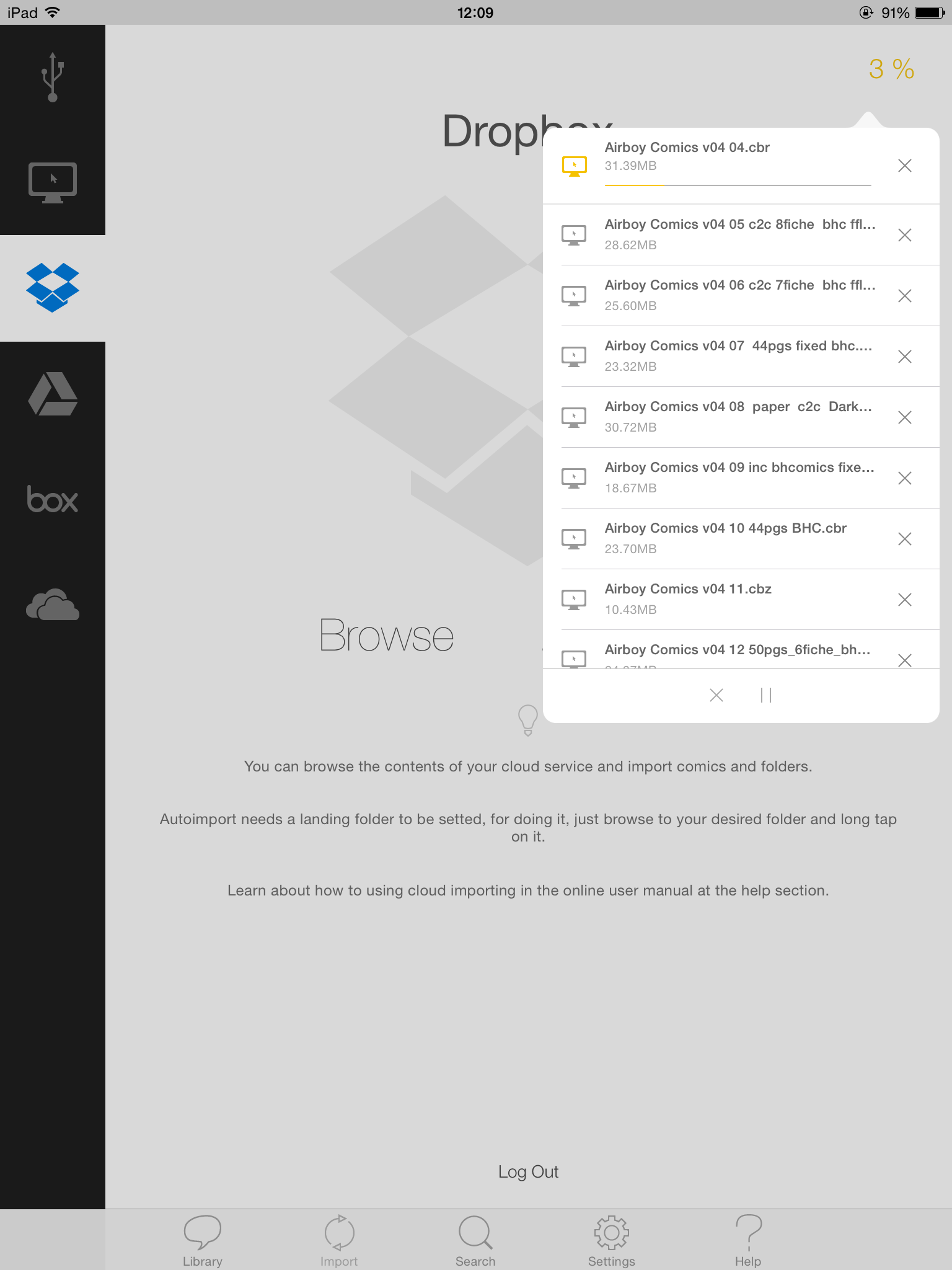
on the old version of the app, I can see the current comic being imported. seems this is gone on the latest version. Can you please consider bringing it back?
it's nice to know what's happening. I was importing some crossovers but I wasn't sure what's happening since the progress bar disappeared.
thanks for listening
it's nice to know what's happening. I was importing some crossovers but I wasn't sure what's happening since the progress bar disappeared.
thanks for listening
Please Log in or Create an account to join the conversation.
- Luis Ángel
-
- Offline
- Administrator
-
Less
More
- Posts: 3354
- Thank you received: 692
11 years 2 months ago #1607
by Luis Ángel
Contribute to the project becoming a patron: www.patreon.com/yacreader
You can also donate via Pay-Pal: www.paypal.com/donate?business=5TAMNQCDD...e=Support+YACReader\
Replied by Luis Ángel on topic Interface Suggestions for New iPad Version
Did you already tapped on the percentage indicator in the top right corner of the import section? There is a whole new importing queue, much better than the old progress bar....
Contribute to the project becoming a patron: www.patreon.com/yacreader
You can also donate via Pay-Pal: www.paypal.com/donate?business=5TAMNQCDD...e=Support+YACReader\
Please Log in or Create an account to join the conversation.
- mrjayviper
- Offline
- New Member
-
Less
More
- Posts: 5
- Thank you received: 0
11 years 2 months ago #1619
by mrjayviper
Replied by mrjayviper on topic Interface Suggestions for New iPad Version
I was using YacLibrary on my MPBr to sync with my iPad. I don't recall seeing this progress interface. I'll check again! thanks
Please Log in or Create an account to join the conversation.
- Luis Ángel
-
- Offline
- Administrator
-
Less
More
- Posts: 3354
- Thank you received: 692
11 years 2 months ago #1625
by Luis Ángel
Contribute to the project becoming a patron: www.patreon.com/yacreader
You can also donate via Pay-Pal: www.paypal.com/donate?business=5TAMNQCDD...e=Support+YACReader\
Replied by Luis Ángel on topic Interface Suggestions for New iPad Version
The progress percentage is visible in that view, no matter what method are you using for import.
Contribute to the project becoming a patron: www.patreon.com/yacreader
You can also donate via Pay-Pal: www.paypal.com/donate?business=5TAMNQCDD...e=Support+YACReader\
Please Log in or Create an account to join the conversation.
Moderators: Luis Ángel