 YACReader
- Posts: 1
- Thank you received: 0
Help and support for MacOSX users.
Setting up Port Forwarding
- necromage5235
- Topic Author
- Offline
- New Member
-

Less
More
5 years 2 months ago #6140
by necromage5235
Setting up Port Forwarding was created by necromage5235
Hello all, I am having an issue setting up port forwarding to set up remote access.
I am in my router settings but it is asking for some info that I cannot find on here or anywhere else.
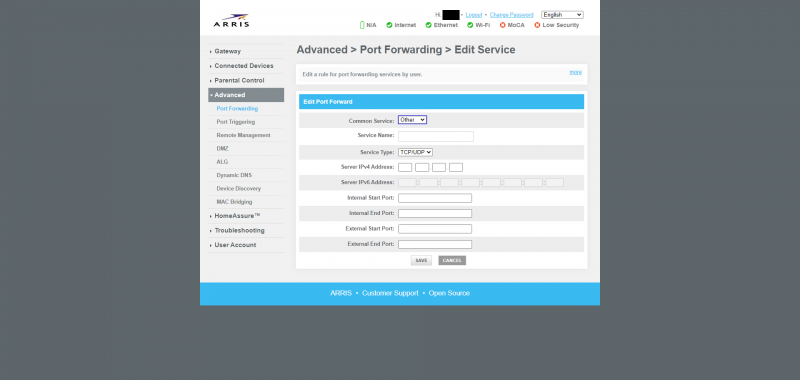
Here is a screenshot with the port forwarding set up
I know the port and IP but I dont know what the external or internal are
I am in my router settings but it is asking for some info that I cannot find on here or anywhere else.
Here is a screenshot with the port forwarding set up
I know the port and IP but I dont know what the external or internal are
Please Log in or Create an account to join the conversation.
- Luis Ángel
-

- Offline
- Administrator
-

Less
More
- Posts: 3354
- Thank you received: 692
5 years 2 months ago #6146
by Luis Ángel
Contribute to the project becoming a patron: www.patreon.com/yacreader
You can also donate via Pay-Pal: www.paypal.com/donate?business=5TAMNQCDD...e=Support+YACReader\
Replied by Luis Ángel on topic Setting up Port Forwarding
External is the port you will using when accessing from outside and internal the port where YACReaderLibrary is running the server on. You can use the same port in both fields.
Contribute to the project becoming a patron: www.patreon.com/yacreader
You can also donate via Pay-Pal: www.paypal.com/donate?business=5TAMNQCDD...e=Support+YACReader\
Please Log in or Create an account to join the conversation.
Moderators: Luis Ángel