 YACReader
- Posts: 20
- Thank you received: 3
Help and support for MacOSX users.
A few questions
- Eurofag
-
 Topic Author
- Offline
- Junior Member
-

Less
More
11 years 2 months ago - 11 years 2 months ago #1594
by Eurofag
A few questions was created by Eurofag
Hi,
First, let me say that I really love your app and I'm trying to move over from the now-dead KBL.
I have a few questions.
In the library, is it possible to change sorting? How about displaying additional columns (e.g. date added / author / etc.).
Would it be possible in the future to add smart folder where you can use keywords (e.g. title contains X, tags) to create filters?
Also, changing reading list tags after creation would be great. And also nesting for them, if possible. By the way, how do I remove a comic from a reading list?
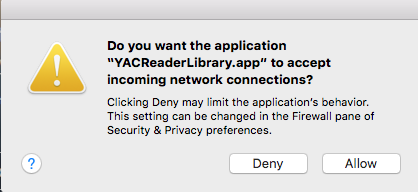
Is there a workaround for the firewall warning after every startup? (pic attached)
And a final one: if I have a highlighted comic, do a search then exit said search (esc), it'd be great to return to the highlighted copy instead of the beginning (grid view).
I think that's all for now, and again, thanks for the great app.
First, let me say that I really love your app and I'm trying to move over from the now-dead KBL.
I have a few questions.
In the library, is it possible to change sorting? How about displaying additional columns (e.g. date added / author / etc.).
Would it be possible in the future to add smart folder where you can use keywords (e.g. title contains X, tags) to create filters?
Also, changing reading list tags after creation would be great. And also nesting for them, if possible. By the way, how do I remove a comic from a reading list?
Is there a workaround for the firewall warning after every startup? (pic attached)
And a final one: if I have a highlighted comic, do a search then exit said search (esc), it'd be great to return to the highlighted copy instead of the beginning (grid view).
I think that's all for now, and again, thanks for the great app.
Last edit: 11 years 2 months ago by Eurofag.
Please Log in or Create an account to join the conversation.
- Luis Ángel
-

- Offline
- Administrator
-

Less
More
- Posts: 3354
- Thank you received: 692
11 years 2 months ago #1595
by Luis Ángel
Contribute to the project becoming a patron: www.patreon.com/yacreader
You can also donate via Pay-Pal: www.paypal.com/donate?business=5TAMNQCDD...e=Support+YACReader\
Replied by Luis Ángel on topic A few questions
Welcome to the forum 
1. No, there is no sorting by now, but it is in the TODO list.
2. Yes, the new special lists "Favorites" and "Reading" are examples of what the new "reading lists/tags" section is capable of. So you can expect new things there in future releases. The search engine has also been improved, and in future releases you will be able to search using filters (f.e. "[writer] Jack")
3. What do you mean by "changing"? You can edit tag/reading lists names. Nesting is only available in reading lists: select a list and then press "+", this will create a sublist (only two levers are allowed). For removing a comic, select it and press the bin icon.
4. In Windows when you allow the app through the firewall the first time you never see this message again...
5. yes, you are right
Thank you for using the app!
1. No, there is no sorting by now, but it is in the TODO list.
2. Yes, the new special lists "Favorites" and "Reading" are examples of what the new "reading lists/tags" section is capable of. So you can expect new things there in future releases. The search engine has also been improved, and in future releases you will be able to search using filters (f.e. "[writer] Jack")
3. What do you mean by "changing"? You can edit tag/reading lists names. Nesting is only available in reading lists: select a list and then press "+", this will create a sublist (only two levers are allowed). For removing a comic, select it and press the bin icon.
4. In Windows when you allow the app through the firewall the first time you never see this message again...
5. yes, you are right
Thank you for using the app!
Contribute to the project becoming a patron: www.patreon.com/yacreader
You can also donate via Pay-Pal: www.paypal.com/donate?business=5TAMNQCDD...e=Support+YACReader\
The following user(s) said Thank You: Eurofag
Please Log in or Create an account to join the conversation.
- selmf
- Offline
- Moderator
-

Less
More
- Posts: 639
- Thank you received: 136
11 years 2 months ago #1598
by selmf
My answers are not necessarily official YACReader statements but mostly represent my own opinion in technical matters.
Replied by selmf on topic A few questions
4. Either add an exception to your firewall or disable the server completely in the library settings 
My answers are not necessarily official YACReader statements but mostly represent my own opinion in technical matters.
The following user(s) said Thank You: Eurofag
Please Log in or Create an account to join the conversation.
- Eurofag
-
Topic Author
- Offline
- Junior Member
-
Less
More
- Posts: 20
- Thank you received: 3
11 years 2 months ago #1599
by Eurofag
Replied by Eurofag on topic A few questions
Thanks for the quick responses!
I'm away for the weekend so will check out some of the above tomorrow.
Regarding the firewall setting, I did add it, but it's not retained (maybe because the app is unsigned?). I'd rather leave the server on as I love to read on my iPad around the house. On that notion, do you plan to make reading lists/tags available when you browse your library through the server?
About the tag edit, I mean the color of the given tag (I use color as a distinction between artist, circle, event, etc tags). However, this was just a question as I can just recreate the tag with correct color and drag all the comics from the other tag.
What is the main difference between tags and readin lists?
Thanks!
I'm away for the weekend so will check out some of the above tomorrow.
Regarding the firewall setting, I did add it, but it's not retained (maybe because the app is unsigned?). I'd rather leave the server on as I love to read on my iPad around the house. On that notion, do you plan to make reading lists/tags available when you browse your library through the server?
About the tag edit, I mean the color of the given tag (I use color as a distinction between artist, circle, event, etc tags). However, this was just a question as I can just recreate the tag with correct color and drag all the comics from the other tag.
What is the main difference between tags and readin lists?
Thanks!
Please Log in or Create an account to join the conversation.
- Luis Ángel
-
- Offline
- Administrator
-
Less
More
- Posts: 3354
- Thank you received: 692
11 years 2 months ago #1600
by Luis Ángel
Contribute to the project becoming a patron: www.patreon.com/yacreader
You can also donate via Pay-Pal: www.paypal.com/donate?business=5TAMNQCDD...e=Support+YACReader\
Replied by Luis Ángel on topic A few questions
I am not sure about the firewall, let's see if other MacOSX users can help with it.
Yes, lists/tags will be available for clients in future releases.
The main difference is that reading lists are sorted by name, and can have sublists. The idea of reading lists is to store complex reading orders....Labels are for whatever you want, for example, I use a red tag for storing bad comic files(incomplete, low quality) that have to be replaced.....
The reading list section can be collapsed to the bottom part when you are not using it, or can be collapsed to the top part when you want to hide the folders section...(just drag the title "READING LISTS" and drag it....)
Yes, lists/tags will be available for clients in future releases.
The main difference is that reading lists are sorted by name, and can have sublists. The idea of reading lists is to store complex reading orders....Labels are for whatever you want, for example, I use a red tag for storing bad comic files(incomplete, low quality) that have to be replaced.....
The reading list section can be collapsed to the bottom part when you are not using it, or can be collapsed to the top part when you want to hide the folders section...(just drag the title "READING LISTS" and drag it....)
Contribute to the project becoming a patron: www.patreon.com/yacreader
You can also donate via Pay-Pal: www.paypal.com/donate?business=5TAMNQCDD...e=Support+YACReader\
The following user(s) said Thank You: Eurofag
Please Log in or Create an account to join the conversation.
- Eurofag
-
Topic Author
- Offline
- Junior Member
-
Less
More
- Posts: 20
- Thank you received: 3
11 years 2 months ago - 11 years 2 months ago #1610
by Eurofag
Replied by Eurofag on topic A few questions
I think this might be the relevant bit regarding the firewall rules
As you can see in the attached screenshot, I have added the exception but it still asks me every time.
One final question (I promise it'll be the last for now, I think I'm coming through already as someone with too many "demands"): would it be possible to add reading lists to the right click context menu's "add to" section (right now you can only assign tags)? And as far as I noticed, alphabetical sorting is not applied to sublists. Is this intentional?
Again, thank you very much for the app and the responses!
support.apple.com/en-us/HT201642Some apps check their own integrity when they are opened without using code signing. If the firewall recognizes such an app it doesn't sign it. Instead, it the "Allow or Deny" dialog appears every time the app is opened. This can be avoided by upgrading to a version of the app that is signed by its developer.
As you can see in the attached screenshot, I have added the exception but it still asks me every time.
One final question (I promise it'll be the last for now, I think I'm coming through already as someone with too many "demands"
): would it be possible to add reading lists to the right click context menu's "add to" section (right now you can only assign tags)? And as far as I noticed, alphabetical sorting is not applied to sublists. Is this intentional?Again, thank you very much for the app and the responses!

Last edit: 11 years 2 months ago by Eurofag.
Please Log in or Create an account to join the conversation.
- Luis Ángel
-
- Offline
- Administrator
-
Less
More
- Posts: 3354
- Thank you received: 692
11 years 2 months ago #1611
by Luis Ángel
Contribute to the project becoming a patron: www.patreon.com/yacreader
You can also donate via Pay-Pal: www.paypal.com/donate?business=5TAMNQCDD...e=Support+YACReader\
Replied by Luis Ángel on topic A few questions
I have to read a little bit about code signing, I am not sure if it is possible without paying for a OSX development license. Thank you for the info, btw.
If you have a lots of comics you will probably end with tons of reading lists, that is the reason for not including them in the context menu...How are you using them? I would really like to know how people are using the new features....
And yes, sublists are not sorted by name, you can drag&drop them for assigning the right order to them.
Don't worry about questions, suggestions and/or demands, I always can ignore them . Just kidding, this is the only way I can hear about users and improve YACReader, so any comments are always welcome
If you have a lots of comics you will probably end with tons of reading lists, that is the reason for not including them in the context menu...How are you using them? I would really like to know how people are using the new features....
And yes, sublists are not sorted by name, you can drag&drop them for assigning the right order to them.
Don't worry about questions, suggestions and/or demands, I always can ignore them
. Just kidding, this is the only way I can hear about users and improve YACReader, so any comments are always welcome Contribute to the project becoming a patron: www.patreon.com/yacreader
You can also donate via Pay-Pal: www.paypal.com/donate?business=5TAMNQCDD...e=Support+YACReader\
Please Log in or Create an account to join the conversation.
- Eurofag
-
Topic Author
- Offline
- Junior Member
-
Less
More
- Posts: 20
- Thank you received: 3
11 years 2 months ago #1612
by Eurofag
Replied by Eurofag on topic A few questions
To be honest, I'm right in the middle of coming up with the right solution.
A bit of background info: I mainly collect Japanese manga and derivative works. Especially the latter since I can usually get my hands on the former when I travel.
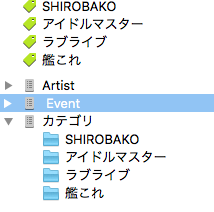
These have the following "main defining" informations: artist, circle, event where it was released and "original work" (the original stuff which served as the basis of the derivative work).
First I went with tags (because of the auto sorting), using tag colors as a distinctions (e.g. red for artists, green for original work, something else for event). However, since these can't be nested or collapsed, the list quickly outgrew even my 27" monitor therefore I started to migrate this structure to nested reading lists and will try to use tags for additional info such as translated/original, crap quality, "theme", owned/wishlist and similar. Then again, I might change my idea overnight.
A bit of background info: I mainly collect Japanese manga and derivative works. Especially the latter since I can usually get my hands on the former when I travel.
These have the following "main defining" informations: artist, circle, event where it was released and "original work" (the original stuff which served as the basis of the derivative work).
First I went with tags (because of the auto sorting), using tag colors as a distinctions (e.g. red for artists, green for original work, something else for event). However, since these can't be nested or collapsed, the list quickly outgrew even my 27" monitor therefore I started to migrate this structure to nested reading lists and will try to use tags for additional info such as translated/original, crap quality, "theme", owned/wishlist and similar. Then again, I might change my idea overnight.
Please Log in or Create an account to join the conversation.
- Eurofag
-
Topic Author
- Offline
- Junior Member
-
Less
More
- Posts: 20
- Thank you received: 3
11 years 2 months ago - 11 years 2 months ago #1613
by Eurofag
Replied by Eurofag on topic A few questions
And about the developer account: I think they merged all the developer programs recently so if you have an iOS developer access (which you should since the app is in iTunes) you should also have Mac developer access with all the required rights.
developer.apple.com/support/transition/
developer.apple.com/support/transition/
Last edit: 11 years 2 months ago by Eurofag.
The following user(s) said Thank You: Luis Ángel
Please Log in or Create an account to join the conversation.
Moderators: Luis Ángel