 YACReader
- Posts: 26
- Thank you received: 0
Help and support for Windows users.
Interface ridiclously small scale for some reason
- rafmib
- Offline
- Junior Member
-

Less
More
4 years 8 months ago #6521
by rafmib
Replied by rafmib on topic Interface ridiclously small scale for some reason
INFO 2022-01-15T12:48:13.469 Device pixel ratio used while rendering: 1
Please Log in or Create an account to join the conversation.
- rafmib
- Offline
- Junior Member
-
Less
More
- Posts: 26
- Thank you received: 0
4 years 8 months ago #6522
by rafmib
Replied by rafmib on topic Interface ridiclously small scale for some reason
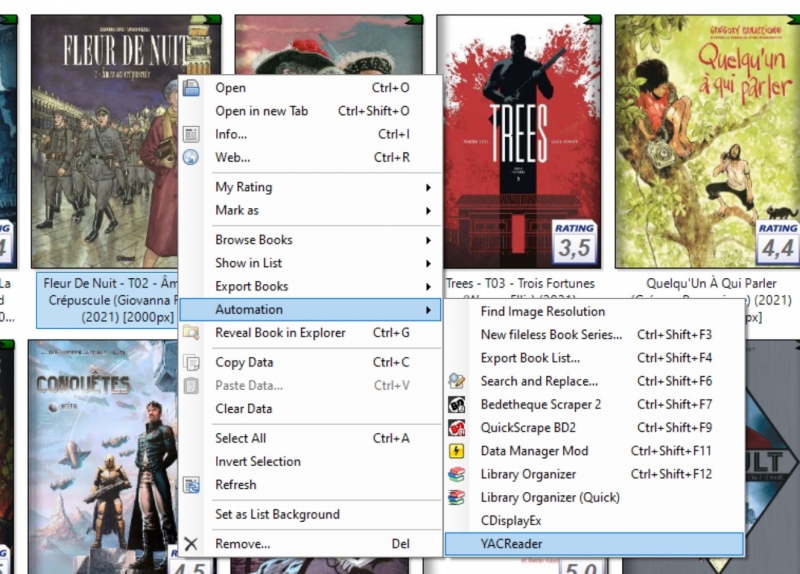
I've just found something, i used to open the comic directelly from ComicRack (see attached image).
When i open the comic directelly from YacReader, rendering is just fine!
When i open the comic directelly from YacReader, rendering is just fine!
Please Log in or Create an account to join the conversation.
- rafmib
- Offline
- Junior Member
-
Less
More
- Posts: 26
- Thank you received: 0
4 years 8 months ago #6523
by rafmib
Replied by rafmib on topic Interface ridiclously small scale for some reason
And if i remove windows HDPi options of ComickRack, opening from CR with YacReader works fine.
So there's definitively something related with launching a new process from an app with HDPI option enabled.
Perhaps you can't do anything about it..
So there's definitively something related with launching a new process from an app with HDPI option enabled.
Perhaps you can't do anything about it..
Please Log in or Create an account to join the conversation.
- selmf
- Offline
- Moderator
-

Less
More
- Posts: 639
- Thank you received: 136
4 years 8 months ago #6524
by selmf
My answers are not necessarily official YACReader statements but mostly represent my own opinion in technical matters.
Replied by selmf on topic Interface ridiclously small scale for some reason
@rafmib: Please mark the topic as solved and send luisangelsm a big box of Ibuprofen. He's spent half of his weekend chasing this bug and I'm pretty sure this has given him a decent headache ...
My answers are not necessarily official YACReader statements but mostly represent my own opinion in technical matters.
Please Log in or Create an account to join the conversation.
- Luis Ángel
-

- Offline
- Administrator
-

Less
More
- Posts: 3354
- Thank you received: 692
4 years 8 months ago #6525
by Luis Ángel
Contribute to the project becoming a patron: www.patreon.com/yacreader
You can also donate via Pay-Pal: www.paypal.com/donate?business=5TAMNQCDD...e=Support+YACReader\
Replied by Luis Ángel on topic Interface ridiclously small scale for some reason
Yeah, nothing to fix then.
Contribute to the project becoming a patron: www.patreon.com/yacreader
You can also donate via Pay-Pal: www.paypal.com/donate?business=5TAMNQCDD...e=Support+YACReader\
Please Log in or Create an account to join the conversation.
- rafmib
- Offline
- Junior Member
-
Less
More
- Posts: 26
- Thank you received: 0
4 years 8 months ago #6527
by rafmib
Replied by rafmib on topic Interface ridiclously small scale for some reason
Yes indeed 
As YacReader is my default program for cbr/cbz, it’s not obvious to guess that when it’s launched from another program it won’t render images the same way on HiDPI screens. Lesson learned!
I’ve found some general explanations here - docs.microsoft.com/en-us/windows/win32/h...desktop-applications - but DPI Awareness is a complicated topic:
To resume for other users with 4K screens that might have the same issue: When opening a comic with YacReader from other programs that aren’t DPI-aware, use the HiDPI Windows settings override on YacReader as it’s the only way to get a proper image rendering.
As YacReader is my default program for cbr/cbz, it’s not obvious to guess that when it’s launched from another program it won’t render images the same way on HiDPI screens. Lesson learned!
I’ve found some general explanations here - docs.microsoft.com/en-us/windows/win32/h...desktop-applications - but DPI Awareness is a complicated topic:
To resume for other users with 4K screens that might have the same issue: When opening a comic with YacReader from other programs that aren’t DPI-aware, use the HiDPI Windows settings override on YacReader as it’s the only way to get a proper image rendering.
Please Log in or Create an account to join the conversation.
Moderators: Luis Ángel