 YACReader
- Posts: 4
- Thank you received: 0
Help and support for Windows users.
Port Forwarding - Enabling Remote YACReader Access
- Grappler1
- Topic Author
- Offline
- New Member
-

Less
More
4 years 1 month ago #6958
by Grappler1
Port Forwarding - Enabling Remote YACReader Access was created by Grappler1
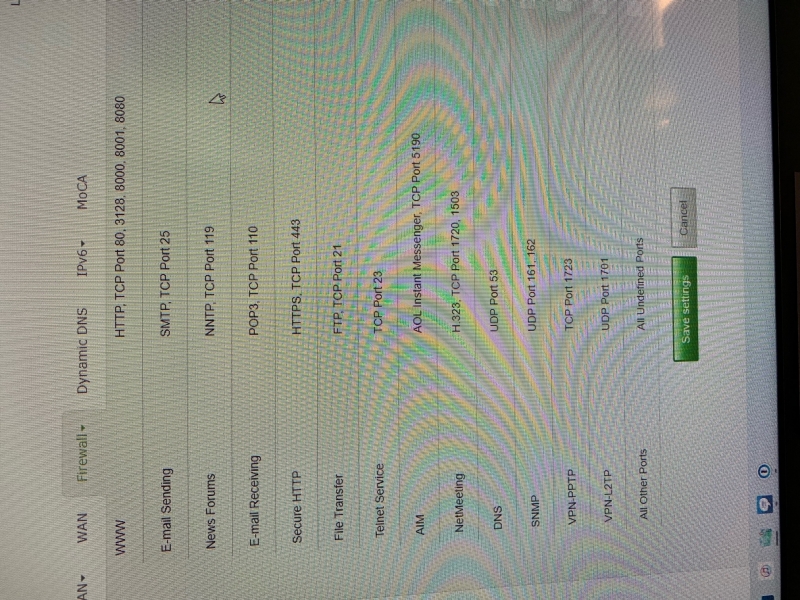
I'm hoping someone here can help me. I'm running YACReader on Windows 11. I've configured the port on it and in my router setup port forwarding using the 192.168 ip address and a range that includes the port needed and I'm unable to gain remote access. I double checked Norton and it's set to allow YACReader through. Do I need to add a firewall traffic in rule? And if so, what port should I use? I've included a picture of my options. I run my own Plex server so I'm somewhat familiar with port forwarding but this has stumped me.
Thanks for any help.
Sean
Thanks for any help.
Sean
Please Log in or Create an account to join the conversation.
- Luis Ángel
-

- Offline
- Administrator
-

Less
More
- Posts: 3354
- Thank you received: 692
4 years 1 month ago #6959
by Luis Ángel
Contribute to the project becoming a patron: www.patreon.com/yacreader
You can also donate via Pay-Pal: www.paypal.com/donate?business=5TAMNQCDD...e=Support+YACReader\
Replied by Luis Ángel on topic Port Forwarding - Enabling Remote YACReader Access
Are you able to access YACReaderLibrary locally using your WiFi? When you try to access remotelly (from ouside your WiFi), what IP/Port do you use in the iOS app?
Contribute to the project becoming a patron: www.patreon.com/yacreader
You can also donate via Pay-Pal: www.paypal.com/donate?business=5TAMNQCDD...e=Support+YACReader\
Please Log in or Create an account to join the conversation.
- Grappler1
- Topic Author
- Offline
- New Member
-
Less
More
- Posts: 4
- Thank you received: 0
4 years 1 month ago #6965
by Grappler1
Replied by Grappler1 on topic Port Forwarding - Enabling Remote YACReader Access
I am able to access YAC reader from my wifi. I've experimented with a number of ports and they all work as long as they are the same on my computer and Iphone. But as soon as I turn off Wifi I no longer have access. I attached the picture because maybe I'm enabling the wrong port for it to work. I've done 8080, and 21 off the top of my head. I enable the port forwarding on my Telus modem jus like I do with Plex, but was wondering if there was a port I needed to open in the firewall as well?
Thanks for the response.
Sean
Thanks for the response.
Sean
Please Log in or Create an account to join the conversation.
- Luis Ángel
-
- Offline
- Administrator
-
Less
More
- Posts: 3354
- Thank you received: 692
4 years 1 month ago #6966
by Luis Ángel
Contribute to the project becoming a patron: www.patreon.com/yacreader
You can also donate via Pay-Pal: www.paypal.com/donate?business=5TAMNQCDD...e=Support+YACReader\
Replied by Luis Ángel on topic Port Forwarding - Enabling Remote YACReader Access
When you disable your wifi you need to change de IP too. Check what's you public IP and use that in the iOS app.
Contribute to the project becoming a patron: www.patreon.com/yacreader
You can also donate via Pay-Pal: www.paypal.com/donate?business=5TAMNQCDD...e=Support+YACReader\
Please Log in or Create an account to join the conversation.
- Grappler1
- Topic Author
- Offline
- New Member
-
Less
More
- Posts: 4
- Thank you received: 0
4 years 1 month ago #6968
by Grappler1
Replied by Grappler1 on topic Port Forwarding - Enabling Remote YACReader Access
What do I need to do about the port number? Also, when I go into my modem I cannot set up my public Ip Address to port forward it as Telus's modems limit port forwarding to Private IP's. Is there anyway around this?
Thanks again!
Thanks again!
Please Log in or Create an account to join the conversation.
- Luis Ángel
-
- Offline
- Administrator
-
Less
More
- Posts: 3354
- Thank you received: 692
4 years 1 month ago #6969
by Luis Ángel
Contribute to the project becoming a patron: www.patreon.com/yacreader
You can also donate via Pay-Pal: www.paypal.com/donate?business=5TAMNQCDD...e=Support+YACReader\
Replied by Luis Ángel on topic Port Forwarding - Enabling Remote YACReader Access
Yeah, port forwarding goes from your public IP to your private IP, so it sounds like the router should be able to handle this.
In a port forwarding scenario you set up a port, any port, in the router and you map it to any port in your computer's local IP.
Imaging setting the port 9999 in your router pointing to the 8080 port used by YACReaderLibrary (or whatever you set). In iOS you have to use 9999 when accessing from outside your wifi, and 8080 when you are in your wifi. I normally use the same port.
So the idea is that you need a mechanism that does this:
YACReader for iOS -> router -> YACReaderLibrary.
YACReader for iOS can only see your router from the outside, so that's the connection data you need to use.
In a port forwarding scenario you set up a port, any port, in the router and you map it to any port in your computer's local IP.
Imaging setting the port 9999 in your router pointing to the 8080 port used by YACReaderLibrary (or whatever you set). In iOS you have to use 9999 when accessing from outside your wifi, and 8080 when you are in your wifi. I normally use the same port.
So the idea is that you need a mechanism that does this:
YACReader for iOS -> router -> YACReaderLibrary.
YACReader for iOS can only see your router from the outside, so that's the connection data you need to use.
Contribute to the project becoming a patron: www.patreon.com/yacreader
You can also donate via Pay-Pal: www.paypal.com/donate?business=5TAMNQCDD...e=Support+YACReader\
Please Log in or Create an account to join the conversation.
- Grappler1
- Topic Author
- Offline
- New Member
-
Less
More
- Posts: 4
- Thank you received: 0
4 years 1 month ago #6976
by Grappler1
Replied by Grappler1 on topic Port Forwarding - Enabling Remote YACReader Access
So I am stuck. My Telus router only lets me setup a private IP which is why I am able to use Plex. It basically only lets me change the last IP numbers of my private IP. It will let me setup a Dynamic DNS but I found that completely confusing and it lost me.
Thanks for trying!
Sean
Thanks for trying!
Sean
Please Log in or Create an account to join the conversation.
- middle_pickup
-

- Offline
- Premium Member
-

Less
More
- Posts: 88
- Thank you received: 7
4 years 1 month ago #6986
by middle_pickup
Replied by middle_pickup on topic Port Forwarding - Enabling Remote YACReader Access
Can I ask why you use a Norton product? Every security expert I've talked with says windows defender is better in every way.
Please Log in or Create an account to join the conversation.
Moderators: Luis Ángel