 YACReader
- Posts: 639
- Thank you received: 136
Help and support for Linux users.
YACReaderLibraryServer in Raspberry Pi
- selmf
- Offline
- Moderator
-

Less
More
9 years 10 months ago #2669
by selmf
My answers are not necessarily official YACReader statements but mostly represent my own opinion in technical matters.
Replied by selmf on topic YACReaderLibraryServer in Raspberry Pi
OK, after doing some checks on the code of YACReaderLibraryServer to see what could've gone wrong in merlino's case I was able to reproduce a situation similiar to what he describes. As YACReaderLibraryServer is still a work in progress it's capabilities are still limited and one of the current limitations is input sanity check.
In less complicated words, it doesn't check for typos in directories or library names (or rather the existence of a directory or library it is given as input). This means it will create empty libraries if you feed it wrong input. This is also one of the reasons why Luis currently recommends using YACReaderLibrary to handle creation of the libraries and using the headless server for serving the libraries only.
In Merlino's case I'd recommend deleting the empty library using the remove-library command and then recreating it. When creating the library, you should make sur that you use an absolute path, i.e. instead of somthing like
use
This also applies to adding existing libraries with the add-library command. If the library path supplied is not valid or there is no library data the current implementation will still report success and add will create an empty library.
I know, it's not pretty, but that is how it is right now. I will try and have a look at the commandline parsing code YACReaderLibraryServer currently uses so we can at least get some basic error checking and it behaves less like alpha software and more like beta
In less complicated words, it doesn't check for typos in directories or library names (or rather the existence of a directory or library it is given as input). This means it will create empty libraries if you feed it wrong input. This is also one of the reasons why Luis currently recommends using YACReaderLibrary to handle creation of the libraries and using the headless server for serving the libraries only.
In Merlino's case I'd recommend deleting the empty library using the remove-library command and then recreating it. When creating the library, you should make sur that you use an absolute path, i.e. instead of somthing like
Code:
YACReaderLibraryServer create-library test ../../Comics/myLibrary
use
Code:
YACReaderLibraryServer create-library test /home/user/Comics/myLibrary
This also applies to adding existing libraries with the add-library command. If the library path supplied is not valid or there is no library data the current implementation will still report success and add will create an empty library.
I know, it's not pretty, but that is how it is right now. I will try and have a look at the commandline parsing code YACReaderLibraryServer currently uses so we can at least get some basic error checking and it behaves less like alpha software and more like beta
My answers are not necessarily official YACReader statements but mostly represent my own opinion in technical matters.
Please Log in or Create an account to join the conversation.
- JOCELYN
- Offline
- New Member
-

Less
More
- Posts: 8
- Thank you received: 0
8 years 11 months ago #3359
by JOCELYN
Replied by JOCELYN on topic YACReaderLibraryServer in Raspberry Pi
Hi,
I've got a little problem.
If we put * * * * * YACReaderLibraryServer start in the crontab, we can see that the process is launch every second.
How can we do to start the library one time, at the boot of the PI.
I'm a little noob with Linux
Second think, I activate a smtp service (sudo apt-get install mailutils mpack ssmtp).
And then I receive every second a mail from Cron <pi@raspberrypi> YACReaderLibraryServer start
who said:
"Logging to /home/pi/.local/share/YACReader/YACReaderLibrary/server_log.log
INFO 2017-10-08T14:23:01.518 YACReaderLibraryServer attempting to start INFO 2017-10-08T14:23:01.519
System & configuration
INFO 2017-10-08T14:23:01.519 SO : Linux (unknown version) INFO 2017-10-08T14:23:01.519 7z : found INFO 2017-10-08T14:23:01.520 Libraries: QMap(("BDs", QPair(1,"/media/pi/Comics"))) INFO 2017-10-08T14:23:01.521
WARN 2017-10-08T14:23:01.523 another instance of YACReaderLibrary is running "
It's stop now because I stop the crontab. From where come this sended mail ?
If I'm not clear, ask me, I'm french...
Best regards
Joce
I've got a little problem.
If we put * * * * * YACReaderLibraryServer start in the crontab, we can see that the process is launch every second.
How can we do to start the library one time, at the boot of the PI.
I'm a little noob with Linux
Second think, I activate a smtp service (sudo apt-get install mailutils mpack ssmtp).
And then I receive every second a mail from Cron <pi@raspberrypi> YACReaderLibraryServer start
who said:
"Logging to /home/pi/.local/share/YACReader/YACReaderLibrary/server_log.log
INFO 2017-10-08T14:23:01.518 YACReaderLibraryServer attempting to start INFO 2017-10-08T14:23:01.519
System & configuration
INFO 2017-10-08T14:23:01.519 SO : Linux (unknown version) INFO 2017-10-08T14:23:01.519 7z : found INFO 2017-10-08T14:23:01.520 Libraries: QMap(("BDs", QPair(1,"/media/pi/Comics"))) INFO 2017-10-08T14:23:01.521
WARN 2017-10-08T14:23:01.523 another instance of YACReaderLibrary is running "
It's stop now because I stop the crontab. From where come this sended mail ?
If I'm not clear, ask me, I'm french...
Best regards
Joce
Please Log in or Create an account to join the conversation.
- selmf
- Offline
- Moderator
-
Less
More
- Posts: 639
- Thank you received: 136
8 years 11 months ago #3360
by selmf
My answers are not necessarily official YACReader statements but mostly represent my own opinion in technical matters.
Replied by selmf on topic YACReaderLibraryServer in Raspberry Pi
Well, you're already using cron, so you can't be that big of a noob.
Two things:
1. Replace "* * * *" with "@reboot" so it doesn't try to relaunch every second
2. If you don't want to get any mail about the lauch redirect the output to /dev/null
Your entry should look more or less like this:
Word of caution, I did not test this. If you're lucky it just works, if not you will have to do your own research testing. Still, this should put you on the right track.
Two things:
1. Replace "* * * *" with "@reboot" so it doesn't try to relaunch every second
2. If you don't want to get any mail about the lauch redirect the output to /dev/null
Your entry should look more or less like this:
Code:
@reboot YACReaderLibraryServer start > /dev/null
Word of caution, I did not test this. If you're lucky it just works, if not you will have to do your own research testing. Still, this should put you on the right track.
My answers are not necessarily official YACReader statements but mostly represent my own opinion in technical matters.
Please Log in or Create an account to join the conversation.
- JOCELYN
- Offline
- New Member
-
Less
More
- Posts: 8
- Thank you received: 0
8 years 11 months ago #3361
by JOCELYN
Replied by JOCELYN on topic YACReaderLibraryServer in Raspberry Pi
Thanks for encouragement et your quick answer.
So it's work now if I redirect the output like that:
No more mail !!!
Before to discover '@reboot', I try first that
And if i put again the command, all is ok. Why must the command be online every second to work ? If it's normal, no problem...yet I have no more mail. But if there is something else to do, I take the soluce
Thanks for all
So it's work now if I redirect the output like that:
* * * * * YACReaderLibraryServer start 2>/dev/null
No more mail !!!
Before to discover '@reboot', I try first that
just to see what append...the library is no more accessible by iOs App.#* * * * * YACReaderLibraryServer start
And if i put again the command, all is ok. Why must the command be online every second to work ? If it's normal, no problem...yet I have no more mail. But if there is something else to do, I take the soluce
Thanks for all
Please Log in or Create an account to join the conversation.
- selmf
- Offline
- Moderator
-
Less
More
- Posts: 639
- Thank you received: 136
8 years 11 months ago #3362
by selmf
My answers are not necessarily official YACReader statements but mostly represent my own opinion in technical matters.
Replied by selmf on topic YACReaderLibraryServer in Raspberry Pi
"#" is for comments, so it disabled that line. You only have to start the server *once*. If you start the cron entry with 5 stars it will try to start a copy of YACReader every minute. Just because you've added 2>/dev/null to remove the messages does not mean it isn't happening anymore! Use "@reboot" instead and reboot your machine once, it should've started after that.
Btw, cron might not be the right tool for that job. It's probably a better idea to create a systemd unit instead.
Btw, cron might not be the right tool for that job. It's probably a better idea to create a systemd unit instead.
My answers are not necessarily official YACReader statements but mostly represent my own opinion in technical matters.
Please Log in or Create an account to join the conversation.
- JOCELYN
- Offline
- New Member
-
Less
More
- Posts: 8
- Thank you received: 0
8 years 11 months ago #3363
by JOCELYN
Replied by JOCELYN on topic YACReaderLibraryServer in Raspberry Pi
Yes I know for the #
It was just to test because I don't understand why in your tuto you put a cron every minute and not just on the boot.
So I would test what append when the cron doesnt work every minute...It seems that the library is no more accessible.
It was just to test because I don't understand why in your tuto you put a cron every minute and not just on the boot.
So I would test what append when the cron doesnt work every minute...It seems that the library is no more accessible.
Please Log in or Create an account to join the conversation.
- selmf
- Offline
- Moderator
-
Less
More
- Posts: 639
- Thank you received: 136
8 years 11 months ago #3364
by selmf
My answers are not necessarily official YACReader statements but mostly represent my own opinion in technical matters.
Replied by selmf on topic YACReaderLibraryServer in Raspberry Pi
Hrrrrm that clearly is an error in the tutorial. I will need to talk to Luis about this. 
Sorry for the slightly harsh answer. I don't use the standalone server myself so it wasn't clear for me that you copied that stuff from the tutorial.
Sorry for the slightly harsh answer. I don't use the standalone server myself so it wasn't clear for me that you copied that stuff from the tutorial.
My answers are not necessarily official YACReader statements but mostly represent my own opinion in technical matters.
Please Log in or Create an account to join the conversation.
- JOCELYN
- Offline
- New Member
-
Less
More
- Posts: 8
- Thank you received: 0
8 years 11 months ago #3365
by JOCELYN
Replied by JOCELYN on topic YACReaderLibraryServer in Raspberry Pi
No problem
Thanks for your help
Thanks for your help
Please Log in or Create an account to join the conversation.
- JOCELYN
- Offline
- New Member
-
Less
More
- Posts: 8
- Thank you received: 0
8 years 11 months ago #3366
by JOCELYN
Replied by JOCELYN on topic YACReaderLibraryServer in Raspberry Pi
One more question:
I create a new library and I have those messages:
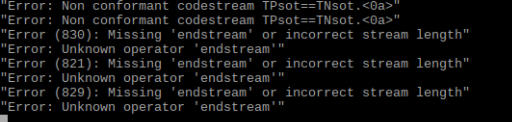
What did they mean ?
I create a new library and I have those messages:
What did they mean ?
Please Log in or Create an account to join the conversation.
- selmf
- Offline
- Moderator
-
Less
More
- Posts: 639
- Thank you received: 136
8 years 11 months ago #3367
by selmf
My answers are not necessarily official YACReader statements but mostly represent my own opinion in technical matters.
Replied by selmf on topic YACReaderLibraryServer in Raspberry Pi
To be honest - no idea. First time I see this myself. We usually recommend to use YACReaderLibrary to create new libraries and the standalone server only to serve them without a gui.
This is just a hunch but maybe there is a conflict between an already running YACReaderLibraryServer and your attempt to create a new library. Kill all instances of YACReaderLibraryServer ("killall YACReaderLibraryServer") and retry. Restart the server afterwards.
If that doesn't help we will need to wait for Luis' input
This is just a hunch but maybe there is a conflict between an already running YACReaderLibraryServer and your attempt to create a new library. Kill all instances of YACReaderLibraryServer ("killall YACReaderLibraryServer") and retry. Restart the server afterwards.
If that doesn't help we will need to wait for Luis' input
My answers are not necessarily official YACReader statements but mostly represent my own opinion in technical matters.
Please Log in or Create an account to join the conversation.
Moderators: Luis Ángel