 YACReader
- Posts: 10
- Thank you received: 3
Help and support for Linux users.
YacReaderLibraryServer dockerized
- jcshumpert
- Offline
- New Member
-

Less
More
7 years 8 months ago #4449
by jcshumpert
Replied by jcshumpert on topic YacReaderLibraryServer dockerized
Good news. I was able to get things working on my Pi using the docker image from my repository. I ended up swapping OS images from DietPi to Raspbian Stretch Lite.
Anyone interested in running YACReaderLibraryServer on a Raspberry Pi should be able to do so pretty simply now without having to compile from source or build the docker image locally on the Pi.
If anyone is interested in more details let me know. I could probably put together a tutorial to cover it in a separate thread. I don't want to hijack this one.
At a high level, you would just need to flash a fresh copy of Raspbian, install docker, mount your comics library (USB Drive, hard drive, NAS share, etc), and then run the commands detailed in my docker repository: hub.docker.com/r/jcshumpert/yacreaderlib...r-docker-raspberrypi
Anyone interested in running YACReaderLibraryServer on a Raspberry Pi should be able to do so pretty simply now without having to compile from source or build the docker image locally on the Pi.
If anyone is interested in more details let me know. I could probably put together a tutorial to cover it in a separate thread. I don't want to hijack this one.
At a high level, you would just need to flash a fresh copy of Raspbian, install docker, mount your comics library (USB Drive, hard drive, NAS share, etc), and then run the commands detailed in my docker repository: hub.docker.com/r/jcshumpert/yacreaderlib...r-docker-raspberrypi
Please Log in or Create an account to join the conversation.
- selmf
- Offline
- Moderator
-

Less
More
- Posts: 639
- Thank you received: 136
7 years 8 months ago #4458
by selmf
My answers are not necessarily official YACReader statements but mostly represent my own opinion in technical matters.
Replied by selmf on topic YacReaderLibraryServer dockerized
Thanks for the update jcshumpert 
We generally could use an updated tutorial for the headless server, including docker details, but I would prefer to have this as a part of our documentation, not as a forum thread. There is already too much scattered information here that I keep meaning to put together for a FAQ or updated instructions, but something else always comes up, so … if you are interested in helping out, we'd appreciate it. We have some ideas of our own of how the guide should look like and what it should cover, so it probably would be good if we have a discussion before you hammer away. We could use the forum, but github or our slack (contact Luis for access) might be a better idea.
We generally could use an updated tutorial for the headless server, including docker details, but I would prefer to have this as a part of our documentation, not as a forum thread. There is already too much scattered information here that I keep meaning to put together for a FAQ or updated instructions, but something else always comes up, so … if you are interested in helping out, we'd appreciate it. We have some ideas of our own of how the guide should look like and what it should cover, so it probably would be good if we have a discussion before you hammer away. We could use the forum, but github or our slack (contact Luis for access) might be a better idea.
My answers are not necessarily official YACReader statements but mostly represent my own opinion in technical matters.
Please Log in or Create an account to join the conversation.
- jcshumpert
- Offline
- New Member
-
Less
More
- Posts: 10
- Thank you received: 3
7 years 7 months ago #4476
by jcshumpert
Replied by jcshumpert on topic YacReaderLibraryServer dockerized
Sure. I could work on a guide wherever you guys need it most. I would need some help to get the details regarding building fully from source (I keep having little issues and haven't gotten a consistently repeatable set of steps to work properly yet). Thanks to the work done by the OP I've been able to modify and get the install process for a Raspberry Pi utilizing docker to some quite simple steps.
Please Log in or Create an account to join the conversation.
- Jamyz
- Offline
- New Member
-
Less
More
- Posts: 9
- Thank you received: 0
7 years 6 months ago #4501
by Jamyz
Replied by Jamyz on topic YacReaderLibraryServer dockerized
Hello everybody !!!
Is it possible to enter a password/user? style .htaccess or other?
Thanks.
Is it possible to enter a password/user? style .htaccess or other?
Thanks.
Please Log in or Create an account to join the conversation.
- Evid3nce
- Offline
- New Member
-
Less
More
- Posts: 12
- Thank you received: 0
7 years 6 months ago #4510
by Evid3nce
Replied by Evid3nce on topic YacReaderLibraryServer dockerized
Thanks TheStryder for your help and clear post, still I don't know why it's not working I did exactly what you explained.
Here are 2 screenshots maybe you can see something I'm doing wrong.
When I try to open a webpage to check if the library is set correctly I just got the message "Safari can't open ...."
Thanks in advance
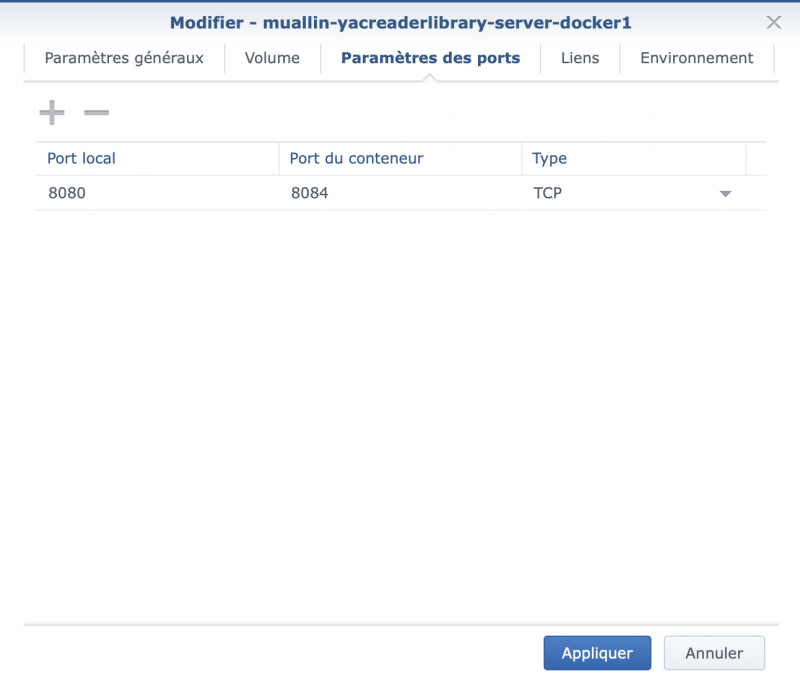
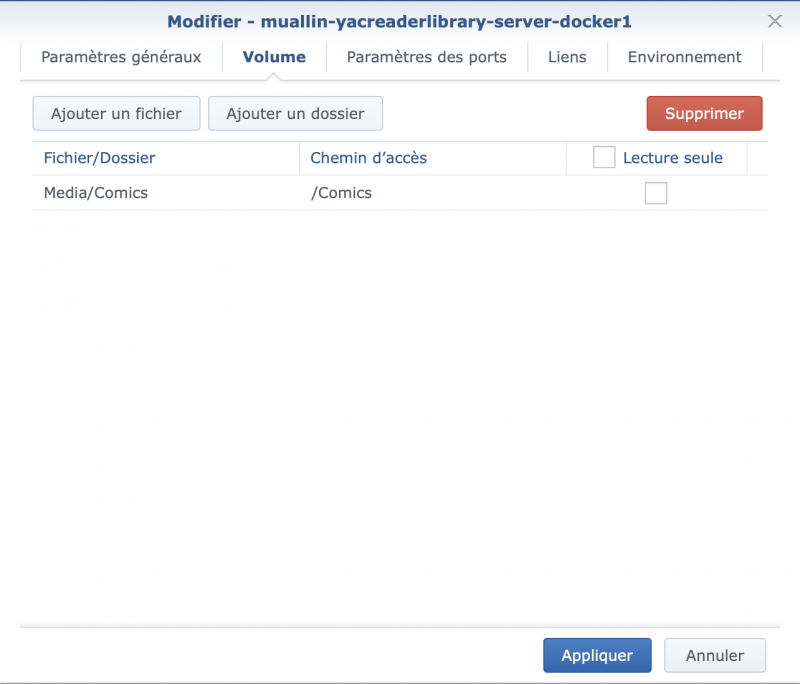
Here are 2 screenshots maybe you can see something I'm doing wrong.
When I try to open a webpage to check if the library is set correctly I just got the message "Safari can't open ...."
Thanks in advance
Please Log in or Create an account to join the conversation.
- alext41
- Offline
- New Member
-
Less
More
- Posts: 18
- Thank you received: 5
7 years 6 months ago - 7 years 6 months ago #4511
by alext41
Replied by alext41 on topic YacReaderLibraryServer dockerized
hi, i'm new to it and will install it on my synology server. Can i also load 2 comic folder?
at the moment i see only this command:
docker run -d -p <port>:8080 -v <comics folder>:/comics --name=yacserver muallin/yacreaderlibrary-server-docker
but with that i can only specify one folder.
But first i run into this problem. I added the container, but i'm not able to browse to the server page after i startet the container. Do i need to enable some ports for this on the synology?
thx
@lex
at the moment i see only this command:
docker run -d -p <port>:8080 -v <comics folder>:/comics --name=yacserver muallin/yacreaderlibrary-server-docker
but with that i can only specify one folder.
But first i run into this problem. I added the container, but i'm not able to browse to the server page after i startet the container. Do i need to enable some ports for this on the synology?
thx
@lex
Last edit: 7 years 6 months ago by alext41.
Please Log in or Create an account to join the conversation.
- alext41
- Offline
- New Member
-
Less
More
- Posts: 18
- Thank you received: 5
7 years 6 months ago #4512
by alext41
This is the same problem that i have. I'm not able to access the web-page after generating all things in the docker configuration. I see the container as running but i'm not able to connect to him.
Maybe someone can help us with this.
Replied by alext41 on topic YacReaderLibraryServer dockerized
Evid3nce wrote: Thanks TheStryder for your help and clear post, still I don't know why it's not working I did exactly what you explained.
Here are 2 screenshots maybe you can see something I'm doing wrong.
When I try to open a webpage to check if the library is set correctly I just got the message "Safari can't open ...."
Thanks in advance
This is the same problem that i have. I'm not able to access the web-page after generating all things in the docker configuration. I see the container as running but i'm not able to connect to him.
Maybe someone can help us with this.
Please Log in or Create an account to join the conversation.
- alext41
- Offline
- New Member
-
Less
More
- Posts: 18
- Thank you received: 5
7 years 6 months ago #4513
by alext41
Replied by alext41 on topic YacReaderLibraryServer dockerized
I found a solution.
I selected that the Container should have the same network settings as the host.Checkbox "use same network as Docker Host" After that i was able to reach it via the default port 8080.
I selected that the Container should have the same network settings as the host.Checkbox "use same network as Docker Host" After that i was able to reach it via the default port 8080.
Please Log in or Create an account to join the conversation.
- Evid3nce
- Offline
- New Member
-
Less
More
- Posts: 12
- Thank you received: 0
7 years 6 months ago #4522
by Evid3nce
Replied by Evid3nce on topic YacReaderLibraryServer dockerized
Alex where do you find this setting ? Is it when you create the container ? Can you upload a screenshot please.
Please Log in or Create an account to join the conversation.
- Evid3nce
- Offline
- New Member
-
Less
More
- Posts: 12
- Thank you received: 0
7 years 6 months ago #4527
by Evid3nce
Replied by Evid3nce on topic YacReaderLibraryServer dockerized
Ok I've found the Checkbox and it's working thanks for the tip Alex, it was not working at first due to the https.
Is there a way to actually connect in Https ?
Is there a way to actually connect in Https ?
Please Log in or Create an account to join the conversation.
Moderators: Luis Ángel